

Smartphone photography has quietly closed the gap between casual coffee shots and the polished, scroll-stopping images flooding your feed. You don’t need a studio. You need a window, decent light, and a few smart decisions.
As visual storytelling continues to drive the coffee industry revolution, mastering these quick smartphone techniques ensures your home brews can compete with the most popular aesthetic feeds.
As millions of daily brews are shared online alongside global coffee consumption data, smartphone photography has quietly closed the gap between casual coffee shots and the polished, scroll-stopping images flooding your feed.
Natural window light does more heavy lifting than any filter. Pair it with the rule of thirds, a clean flat lay, and a quick pass through Snapseed, and that morning latte art stops looking like a snapshot and starts looking intentional.
Once you have mastered capturing your morning brew at home, you might find yourself inspired to design a coffee space of your own that channels industrial and minimalist aesthetics.
What You Need Before You Start
A modern smartphone camera is all you genuinely need to take Instagram-worthy coffee photos (the gap between a flagship phone and a professional DSLR matters far less than how you use light, composition, and a clean lens). Most phones made in the last three or four years shoot at resolutions and dynamic ranges that would have seemed absurd on a dedicated camera a decade ago. The gear isn’t the bottleneck. Your eye is.
That said, two cheap additions will quietly solve problems before they start.
A mini phone tripod, the kind that costs less than a cup of specialty coffee, eliminates camera shake in low light, which is the single most common reason phone photos come out soft and blurry. And a small portable reflector, or honestly just a folded white cardboard sheet, bounces light back into the shadow side of your scene and fills in the dark patches that make a beautiful latte look flat. You don’t need to spend much. creative photographer Bryan Schiele, a real estate photographer and creator of the @letsbrew.coffee Instagram account, put it plainly:
“If you couldn’t tell by my feed, I’m a big fan of color—which I attribute completely to inexpensive sheets of poster board I find at the dollar store or art supply store.”
Poster board. Dollar store. That’s the level of investment we’re talking about.
The one thing that’s genuinely non-negotiable: a microfiber cloth to wipe your lens before every single shoot. A phone lens lives in your pocket, pressed against keys and fabric, collecting oils and micro-scratches. Even a thin film of grease will soften the entire image and add a hazy glow that no editing app can fully fix. A clean shirt works in a pinch.
On the software side, install Snapseed (it’s free, it’s powerful, and it gives you precise control over exposure, color, and detail without requiring any editing background). VSCO and Lightroom Mobile are solid alternatives if you want more preset-driven workflows, but Snapseed is where to start.
Here’s what that minimal setup actually looks like in practice:

Smartphone, tripod, reflector, cloth, one app. That’s the whole kit. Everything else in this guide is about learning to use these five things well, starting with the most important variable of all: light.
Find the Best Light
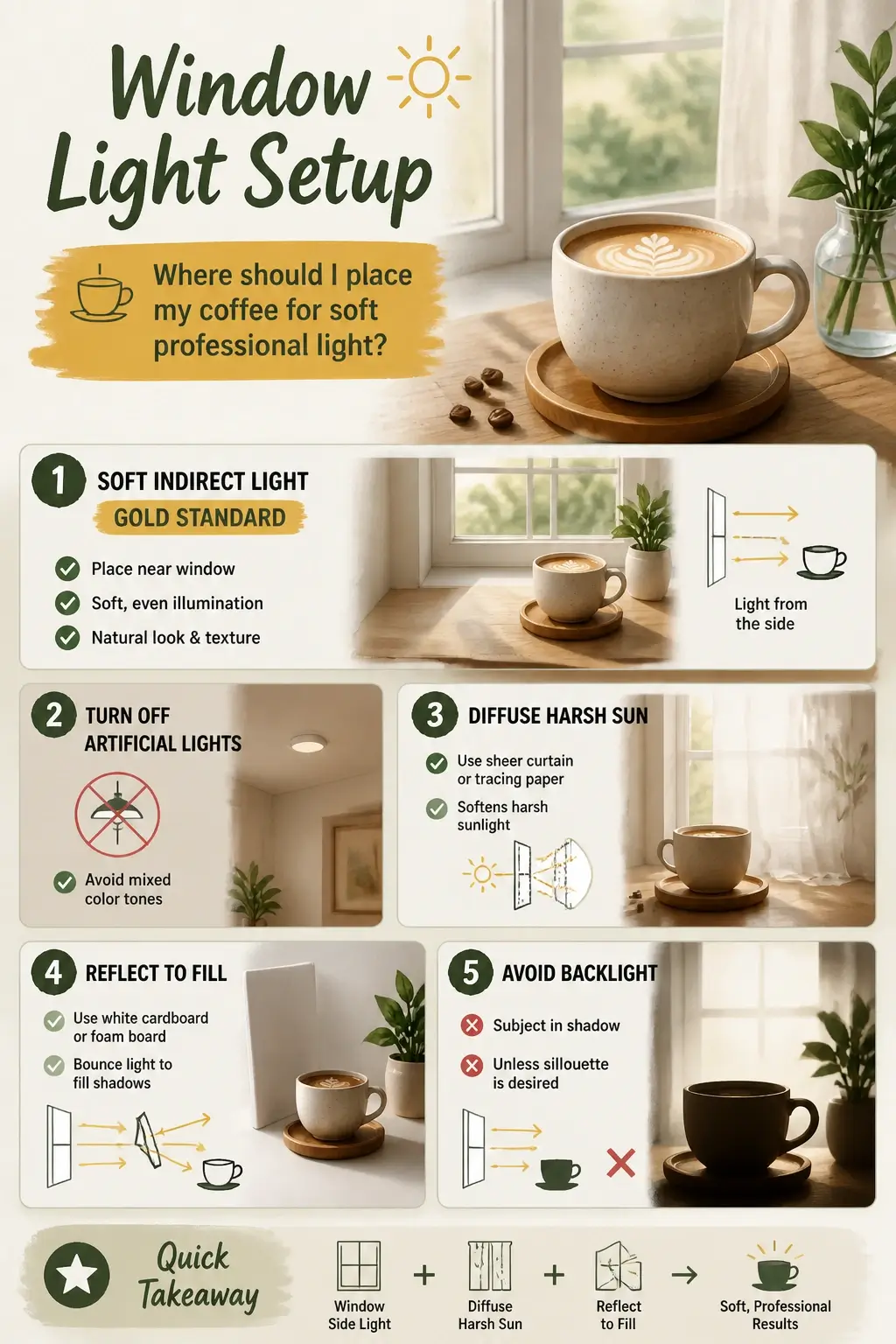
Soft, indirect window light is the single biggest upgrade you can make to your coffee photos: position your cup on a table near a large window with the light hitting it from the side, and you’ll immediately see the difference between a flat snapshot and something that looks intentional.
Here’s why that works. Light coming from the side rakes across the surface of the drink and any props around it, creating gentle shadows that give everything depth and dimension. Front-facing light flattens everything. Side light sculpts it.
First thing to do when you sit down to shoot: turn off every ceiling light in the room. Artificial overhead lighting mixes with natural light and creates an ugly yellow-orange color cast that no filter fully fixes. Natural window light is clean. Mixed light is a mess. Pick one source and commit to it.
If the sun is hitting your window directly and casting sharp, high-contrast shadows, you don’t need to wait for cloud cover. Hang a sheer white curtain, tape a sheet of tracing paper to the glass, or even prop a white tissue over the window. Any of those will scatter the light and turn that harsh beam into something soft and even, the same way a photography studio softbox works, just with materials from your kitchen drawer.
Now, soft light from one side is great, but it leaves the opposite side of your cup in shadow. That’s where the “reflect to fill” trick comes in. Take a piece of white cardboard, a foam board, or even an open white notebook and prop it on the opposite side of the cup from the window. It bounces light back into the shadow side and reduces the contrast so you can see detail in both the bright and dark areas of the shot. You’re not adding a second light source (you’re recycling the one you already have).
One thing to watch: don’t put the window directly behind your coffee. Backlighting (where the light source is behind the subject) works if you’re going for a moody silhouette, but it kills the appetizing detail you want to see in latte art, crema, or steam. Keep the light in front or to the side.
There’s one more thing most beginner guides skip entirely: surface reflections. Coffee is a dark, liquid mirror. Your window, the ceiling, your own phone, all of it can show up as a bright blob floating on the surface of the cup and completely ruin an otherwise clean shot.
The fix is simpler than you’d think. Once you’re framed up, look at the surface of the liquid and slightly shift your angle or nudge the cup’s position until that bright reflection slides out of frame. If you can still see your own silhouette staring back at you from the coffee, hold a dark piece of fabric or black cardboard on the side opposite the window. It absorbs the stray light hitting the surface from that direction and the reflection disappears. It’s a fast, zero-cost fix, and once you know to look for it, you’ll catch it every time before you shoot.
Get the light right, and you’ve solved half the photo before you’ve touched your phone settings. But even a perfectly lit scene can look soft or washed out if the lens has a smudge on it, which is where most people’s “great light, bad photo” frustration actually comes from.
The 10-Second Phone Prep
A dirty camera lens is the most overlooked reason coffee photos come out soft (not your lighting, not your phone, not your skill). Lens grime from fingers, steam, and bag pockets scatters incoming light across your phone’s small sensor, and the whole image turns hazy before you’ve even touched a setting. One dry wipe with a microfiber cloth, and you’re shooting clean.
That wipe takes three seconds. Do it before every single shoot. Even a faint smudge of finger oil or coffee steam leaves a permanent haze in the shot, the kind that makes a beautiful latte look like it was photographed through a foggy window. A microfiber cloth is ideal, but the soft inner hem of your shirt works fine in a pinch.
While you’re in setup mode, turn on your gridlines. On iPhone: Settings > Camera > Grid. On Android: Camera Settings > Grid Lines. Those lines do two things: they help you align the horizon so your cup isn’t tilting, and they give you the reference points you’ll need for composition in the next section.
Two more habits worth locking in now:
- Never use digital zoom. Walk physically closer to your subject instead. Digital zoom doesn’t magnify the image, it crops the sensor data you already have, which destroys sharpness and detail. Your feet are a better lens than that slider.
- Use the 2-second timer or voice command if you’re shooting on a tripod. Tapping the shutter button sends a tiny vibration through the phone right at the moment of capture. A 2-second delay lets that shake settle before the photo fires.
The lens wipe and the exposure trick you’ll learn next are what the coffee photography community calls the “Minimum Viable Protocol”, two steps, under 10 seconds total, that fix the two most common reasons beginner shots fall flat. Clean glass first. Then we’ll talk about taming that blown-out white foam.
Control Brightness Like a Pro
Exposure compensation is the single most underused tool in taking Instagram-worthy coffee photos, and it’s the direct reason your latte foam turns into a featureless white blob. Your phone’s camera sees a bright white surface and tries to average everything out, blowing the highlights before you even tap the shutter. The fix takes two seconds, and it changes everything.
Here’s what’s actually happening. When you point your phone at a latte, the sensor has to make a call: expose for the dark coffee liquid, or expose for the bright white foam. It tries to split the difference, and in doing so, it overexposes the foam past the point of no return. That’s highlight clipping: the sensor records pure white where there should be swirling texture, microfoam detail, and the soft edges of latte art. Once that data is gone, no amount of editing brings it back.
The MDPI Sensors Journal puts it plainly:
“Images captured with unreasonable exposures will greatly reduce visual quality. Exposure problems can be categorized as follows: (i) over‑exposure, i.e., bright and losing image regions caused by too‑long exposure; (ii) over‑exposure, i.e., dark and drowned‑in noises caused by too‑short exposure.”
That first category (bright and losing image regions) is exactly what’s eating your foam texture.
The two-second fix: Tap the coffee cup on your screen. A small sun icon appears next to the focus point. Drag that slider down. You’re not going for dramatic; you’re targeting -0.7 to -1.0 EV, just enough that the brightest parts of the frame (milk foam, crema, steam wisps) show actual texture instead of blown-out white. The difference is immediate and obvious: instead of a cloud-like white blob with no definition, you see the individual bubbles in the microfoam, the soft ridges of a rosette, the way the crema fades at its edges.
The mental model that makes this click: think of your phone’s dynamic range as a fixed window. You can slide that window up or down, but you can’t stretch it. Slide it too high and the bright highlights fall off the top edge (gone forever). Slide it slightly down and the highlights land inside the window, while the shadows fall near the bottom. Shadows can be pushed back up in Snapseed. Highlight clipping cannot be undone. This is why experienced phone shooters deliberately underexpose coffee shots. The internet’s old “shoot in the brightest spot” advice was built around DSLR sensors with far more dynamic range headroom. On a phone, that advice hands you a washed-out foam blob and calls it well-lit.
One real caution: this trade-off has a floor. In a genuinely dark café corner (think less than 50 lux, the kind of ambient light where you’re squinting at the menu), dragging exposure down forces your phone to raise its ISO to compensate. High ISO introduces grain, and grainy foam texture is a different problem than blown foam texture, but it’s still a problem. In those situations, stabilize the phone first. Rest it on a folded napkin, a stack of books, or a small tripod. With camera shake eliminated, you can lower exposure further without the sensor needing to push ISO into noisy territory. Stabilize, then expose down, in that order.
The before-and-after is worth burning into your mental image library. Overexposed: flat white oval sitting on brown liquid, no depth, no detail, looks like a stock photo from 2009. Properly exposed: you can see the actual surface of the foam, the way steam catches the light at the edge, the micro-contrast between the milk and the espresso underneath it. That second image is what stops the scroll.
Frame the Perfect Shot
Strong composition turns a well-lit, sharp photo into something that stops the scroll, and it comes down to three angles and one counterintuitive rule about empty space.
Rule of Thirds in Coffee Shots
The rule of thirds is the fastest way to make your composition feel intentional. Turn on your gridlines (Settings → Camera → Grid on most phones), and you’ll see a tic-tac-toe board laid over your screen. Those four intersection points (where the lines cross) are where your eye naturally lands first. Put your coffee cup there, not dead center. Dead center feels like a mugshot. Off-center feels like a choice.
Flat Lay and the 45-Degree Angle
The angle you shoot from changes the entire personality of the photo.
Flat lay means standing directly over your table, camera face-down and parallel to the surface, about 12–15 inches above the drink. This is the go-to for latte art, scattered ingredients, or any setup with a geometric or patterned surface, because you’re showing the whole scene like a map. The challenge is keeping your shadow out of the frame, so position yourself with the light source behind you.
The 45-degree angle is the opposite instinct, and honestly it’s the most naturally appetizing of the three. It mimics the perspective of someone sitting across the table (close, warm, like you’re about to reach for the cup yourself). This angle works especially well for drinks with height: a foamy cappuccino, a layered cold brew, anything where the side profile tells the story.
Negative Space Pulls the Eye
Here’s the counterintuitive part: leaving empty space in your frame makes the coffee look more prominent, not less. A clean stretch of table, a plain wall, a solid-colored linen, these give the eye nowhere else to go. That’s the editorial look you see on coffee shop feeds. It feels modern because it’s deliberate.
Styling the scene follows the same logic. One simple prop (a spoon resting beside the cup, a folded napkin, an open book with the spine facing the camera, a pair of glasses set at an angle) adds warmth and tells a story. Two props, maybe. Three and you’ve built a still life. The coffee should always be the sharpest, brightest element in the frame. If something in the scene is competing for attention, pull it back or cut it out entirely.
Get these three compositions in your muscle memory, thirds, flat lay, 45 degrees, and you’ll have a starting point for almost any coffee photo you shoot. The next challenge is speed: steam disappears in seconds, a pour-over stream lasts even less.
Capture the Coffee Moment
Coffee action photography sequences live and die by one rule: the window is shorter than you think. Latte art starts breaking down, crema fades, and steam disappears within 10 to 20 seconds of the pour, which means your composition, exposure, and focus need to be set before the cup lands on the table. By the time you’re fussing with settings, the moment is already gone.
Think of it like catching a wave. You don’t paddle once you see it. You’re already in position.
Latte Art and Pour‑Over Timing
Latte art demands a flat lay (straight down, top-to-bottom) so the full pattern fills the frame without distortion. Before the barista even finishes pouring, your phone is up, gridlines on, exposure dialed slightly low so the white milk lines stay crisp and don’t blow out into a single pale blob. Tap to lock focus directly on the art, not the rim, not the table.
For pour-over action, drop to a 45° angle or just below it and point your focus at the stream where water meets the coffee bed. That’s where the texture lives: the bloom, the turbulence, the color. If the room is dim, brace your elbows on the table or press the phone against something solid. A sharp photo of a blurry pour is still a blurry photo.
Here’s a real walkthrough of the flat-lay pour in motion, the physical timing and camera position that text can only approximate:
Steam, Café Depth, and Clean Details
Steam is nearly invisible until light catches it from the side or behind. Position the cup so a window sits behind or beside it, rim-lighting the vapor against a darker wall or background. That contrast is what makes steam show up as a soft, rising wisp instead of nothing. Fire off several shots in quick succession (steam moves fast and changes shape every half-second, so you’re picking the best frame after the fact, not trying to nail it on one attempt).
Café interiors reward a step back. Wide framing that pulls in the espresso machine, a wooden counter, a rain-streaked window, these details give the coffee a sense of place. Keep the cup in the foreground, let the interior go slightly soft behind it, and use that 45° angle to layer the scene with depth rather than flattening it.
One last thing before you tap the shutter: look at the cup and the surface around it. Wipe any stray drips off the side of the mug. Clear coffee grounds off the table. Blot a smudge on the saucer. It takes five seconds and it’s the single detail that most separates a snapshot from a photo that looks intentional. Taking Instagram-worthy coffee photos isn’t just about light and angles, it’s about controlling every element inside the frame, right down to the one small drip you almost didn’t notice.
Quick Edits That Make Photos Pop
Snapseed (free on both iOS and Android) is the fastest path from raw shot to Instagram-ready image, and it handles everything a coffee photo needs without a learning curve. VSCO and Lightroom Mobile are equally solid alternatives if you already have them, and the adjustments we’re about to walk through exist in all three. The workflow is the same: three corrections, in order, and you’re done.
Start with white balance. Open your image in Snapseed, tap Tools, then Tune Image, and scroll to Warmth. This single slider is doing more work than most people realize. If your white cup looks orange, drag left. If it looks blue or gray, drag right. Stop the moment that cup reads as clean white. That one fix changes how appetizing the coffee looks (warm amber tones in the drink become intentional, not accidental, once the neutral whites are actually neutral).
Then dial in contrast and shadows. Still inside Tune Image, nudge contrast up (somewhere between +5 and +15 is usually enough). You’re not trying to make the photo dramatic; you’re giving the coffee depth so it doesn’t look flat on a phone screen. If the table texture underneath your cup disappeared into darkness, lift the Shadows slider slightly until you can see it again. Don’t touch Highlights (you worked hard to protect those in-camera, and this isn’t the moment to blow them out).
Finish with crop and straighten. Tap the Crop tool and use the grid overlay to check your horizon. A slightly tilted cup handle or a slanted table edge is surprisingly common and surprisingly distracting. Straighten it, then crop tighter if there’s dead space at the edges that adds nothing. Tighter framing almost always improves a coffee photo, it removes visual noise and pulls the viewer straight to the drink.
One thing worth saying clearly: stop before you think you’re done. The edits that ruin coffee photos aren’t the ones people forget to make, they’re the ones people make too enthusiastically. Heavy sharpening creates halo artifacts around the rim of the cup that look like a bad scan. Pushing saturation turns milky lattes and flat whites nuclear orange in about three slider ticks. And cropping in digitally during the edit (essentially zooming into the photo after the fact) degrades the image quality you captured. Keep it natural. The goal of editing taking Instagram-worthy coffee photos isn’t transformation; it’s refinement.
When Things Go Wrong in Coffee Photos
Common coffee photo problems almost always trace back to four culprits, and once you can name the culprit, the fix takes about thirty seconds. You don’t need to reshoot everything from scratch. You need a quick diagnosis.
Here’s how to read what went wrong and correct it.
Overexposed highlights (the white foam blob): Your phone metered for the wrong part of the scene and blew out the brightest area. Before you reshoot, tap the foam on your screen and drag the exposure slider down until the texture reappears. In Snapseed, pull Highlights further left until the foam shows detail again. Going forward, make it a habit to glance at the brightest spot in the frame before you press the shutter, if it’s a flat, textureless white, drop the exposure first.
Soft or blurry image: Nine times out of ten, a smudged lens is the culprit. A fingerprint on the lens acts like a soft-focus filter you never asked for, and no amount of sharpening fully undoes it. If the shot is already taken, Snapseed’s Details tool can rescue a mildly soft image, but severe blur is gone for good. Make the lens wipe a ritual before every session, not an afterthought.
Harsh shadows or uneven lighting: The coffee is too far from the window, or the light is hitting it at too steep an angle. Move the cup closer to the light source and prop your white reflector (or a folded piece of white paper) on the shadow side to bounce light back in. If the photo is already taken, open Snapseed’s Selective tool, tap the dark side of the cup, and lift the brightness just on that area, without touching the rest of the frame.
Unappealing color cast: That orange-ish or blue-ish tint isn’t a vibe, it’s a white balance problem. professional photographer Keoki Sasaki, photographer and writer, puts it simply:
“If your photos are coming out a little bit too reddy-orange (warm) or blue-ish (cool), all you need to do is fix your white balance, whether on your camera or in post.”
In Snapseed, go to Tune Image → Warmth and adjust until the white cup looks white, not tinted. The coffee’s brown tones will correct themselves once the neutral anchor is right.
Those four fixes cover the vast majority of what goes wrong. But here’s something the standard advice skips: even with every technique in place, learning photography feels genuinely messy without feedback on your specific images. A blog can tell you to “fix your white balance”, it can’t look at your photo and tell you why the left side still looks off.
The fastest way past that wall is targeted, human feedback. Post your photo in a beginner-friendly coffee photography community or a food photography forum, and ask a specific question. “How do I reduce the reflection on the left side of the cup?” gets you a useful answer. “Is this good?” gets you a thumbs up and nothing else. Coffee photography communities are full of practitioners who will look at your actual image and tell you exactly what’s happening, because they know textbook advice only goes so far.
Keep your phone close whenever you’re making coffee. The best practice shot is the one you almost didn’t take. Every photo you shoot (good or flat or blown out) teaches you something the next one benefits from. That feedback loop, over time, is the whole skill.
Key Takeaways on Taking Instagram-Worthy Coffee Photos
- A clean lens and locking exposure on the foam prevent the two most common coffee photo failures before you even frame the shot.
- Side-lit window light sculpts texture, but you must recycle it with a white card to reveal detail lost in shadow.
- Properly exposed foam texture can be refined, but blown highlights are permanently lost — underexpose slightly and lift shadows in post.
- Composition signals intent: a flat lay, 45-degree angle, and intentional negative space stop the scroll faster than any filter.
- You have about 10 seconds to capture latte art or steam before it degrades — set focus and exposure before the barista finishes the pour.
- Editing refines a strong photo, it doesn’t rescue a weak one — fix white balance, contrast, and crop, then stop before it looks forced.
Frequently Asked Questions About Taking Instagram-Worthy Coffee Photos
Q: Why does my latte art look like a shapeless white blob when I know the pour was perfect?
A: Your phone’s sensor can’t handle the contrast between dark coffee and bright foam, so it clips the highlights into pure white. You’re not capturing microfoam texture; you’re recording empty sensor data. Lock focus on the foam and drag exposure compensation down to -0.7 or -1.0 EV before shooting.
Q: If I already have great window light, why do my coffee shadows still look harsh and muddy?
A: Uncontrolled window light is only half the equation. The shadow side of your cup is starving for photons while the lit side is flooded. You need to recycle existing light by propping a white card or open notebook opposite the window to bounce fill back into those dark patches.
Q: What single editing mistake turns a sharp coffee photo into something that looks fake or cheap?
A: Over-correcting saturation and sharpening. Pushing the warmth slider until a white mug turns nuclear orange or ramping up structure until the cup’s rim develops a crunchy halo instantly signals aggressive amateur editing. You want refinement, not a complete visual overhaul of the drink.
Q: Can I actually capture visible steam with just a smartphone camera?
A: Yes, but light must illuminate it from behind or the side, not the front. Position the cup between your lens and a dark background, letting a window behind the cup rim-light the vapor. Burst mode is essential because steam dissolves and reshapes itself in fractions of a second.
Q: Why does my handheld photo look grainy even in what seems like decent light?
A: In moderately dim spaces, your phone aggressively ramps up ISO to avoid a blurry shot, introducing visible grain. When you drag the exposure slider down to save highlight detail, ISO spikes further. Stabilize the phone on a folded napkin or tripod first, then reduce exposure without the sensor noise penalty.
Q: What detail do most beginners never notice that instantly separates an amateur shot from a professional one?
A: Liquid surface reflections. A dark drink is a mirror that catches bright blobs of your window, ceiling, or even your own phone hovering above it. Slightly shift your angle or hold a dark piece of fabric off-camera to absorb stray light and kill that hazy glare before you tap the shutter.
References
- Interview with Bryan Schiele of @letsbrew.coffee – Sprudge
- Research on exposure problems in photography – MDPI Sensors Journal
- Coffee photography tips and white balance advice from Keoki Sasaki – Perfect Daily Grind